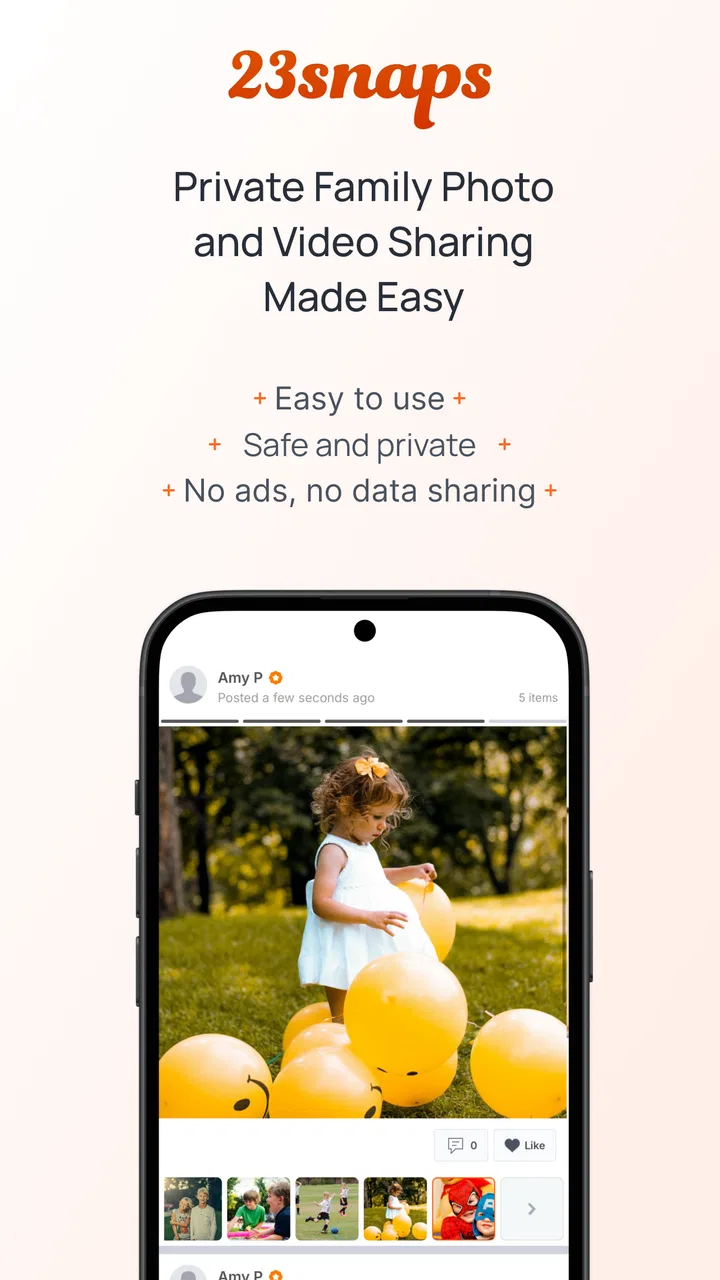
23snaps: Private Family Album
- 4.4
- Rating
- 100.00K
- Installs
- Free
- Price

 Analysis by App-foxy
Sharing a child’s photos with relatives sounds simple until a normal family chat becomes crowded with unrelated messages, forwarded images, and people who were never meant to see every update. 23snaps: Private Family Album takes a more focused approach: it is a parenting app built around sharing baby photos and videos with a chosen family audience. I found its main appeal in that narrow purpose. Instead of treating family memories as just another stream inside a social network, it gives them their own space.
The app is free to download, carries a Teen content rating, and comes from 23 Snaps Ltd. It has been available since December 6, 2012, and its current version is 9.2.0. On Android, it requires version 7.0 or later. Its average rating is 4.4 from around 1.9 thousand ratings, with over 100 thousand installs, which suggests that it has found a steady audience among parents who want a quieter way to keep relatives involved.
My overall impression is positive, but it depends heavily on what you want from a family album. This is not a replacement for a full photo-storage service, a general-purpose messaging app, or a polished editing suite. It works best when the goal is regular, private-feeling sharing with grandparents, close relatives, or trusted friends, and when everyone agrees to use one dedicated place for those updates.
You May Also Like

 Blood Strike: 2.5 Anniversary
Blood Strike’s Loadouts Turn Every Drop Into a Tactical Gamble
A close look at Blood Strike’s custom loadouts: how fast access to signature weapons reshapes its battle royale rhythm, rewards preparation, and narrows the gap between fights.

 Pandora - Music & Podcasts
Pandora’s Music Is Easy to Start, but Harder to Recover
Pandora’s strength is its low-effort path from a seed to a station. Its weak spot is how much confidence it asks you to place in connection, setup, and quiet recovery.

 8 Ball Pool
 Is Built on Rivalries, Rematches, and Routine
A close look at the rivalries, rematches, shared routines, and unanswered safety questions that turn a quick pool match into a persistent mobile community.

 Samsung Music
’s Quiet Strength Is Playing What You Already Own
Its reach comes less from spectacle than from dependable access to a personal library. That simplicity is both the app’s strongest retention engine and its ceiling.

 AccuWeather: Weather Radar
AccuWeather Review: A Quick, Clear Forecast for Everyday Decisions
For everyday plans, the best forecast is the one you can understand quickly. AccuWeather makes rain timing, radar, and local conditions easy to act on, with a few trade-offs.

 Hill Climb Racing
Why Hill Climb Racing Still Turns Crashes Into One More Run
A tiny car, a bumpy hill and one more upgrade: Hill Climb Racing keeps resurfacing because its simple chaos makes every near-miss feel personal.
More From Our News Desk



How the everyday family workflow feels
The most useful way to approach 23snaps is to decide what role it will play before inviting everyone in. I would treat it as a running family journal rather than as a second camera roll. After taking a picture or short video, I can share it with the people who actually need to see it, add context, and leave it there for relatives to revisit later. That is a much cleaner habit than sending the same image separately through several conversations.
A realistic example is a weekday afternoon when one parent is at work and a grandparent lives in another city. A new photo from the playground can go into the family album instead of being posted to a broad social feed. The grandparent can follow the child’s small milestones without receiving unrelated notifications from a group chat. Later, the family has a chronological collection of moments rather than a scattered trail of attachments.
I especially like this model for relatives who do not want to join a larger social platform. The app’s purpose is obvious as soon as it is opened: it is about family updates, not public discovery, trending content, or maintaining a personal profile for strangers. That focused design can reduce the emotional overhead of deciding where every child-related image belongs.
There is also a practical benefit to separating family photos from ordinary conversations. In a messaging app, important pictures can disappear beneath jokes, links, voice notes, and unrelated discussions. In a dedicated album, the context remains attached to the family stream. That makes the service more useful over time, especially when relatives want to look back at earlier updates instead of searching through months of chat history.
Still, the private-album idea only works when the invited audience is managed thoughtfully. I would not add every distant acquaintance simply because they are technically related. A smaller group makes the app feel more intentional and reduces the chance that parents will stop sharing because the audience has become too broad. The best experience comes from treating access as a family decision, not as an automatic consequence of uploading a picture.
What I would do before the first upload
I would begin by agreeing on a simple routine with the people who will use the album. For example, one parent might post ordinary daily moments, while grandparents use the app mainly to react and comment. Establishing that expectation matters because a family album can become noisy if every participant treats it like a general chat room.
I would also decide whether the album is for frequent snapshots, meaningful milestones, or both. If every blurry duplicate is uploaded, the collection becomes harder to browse. If the rules are too strict, relatives may miss the casual moments that make the service worthwhile. My preference is to share fewer near-identical images and keep the one that best captures the moment.
Another useful habit is adding a short description when the image needs context. “First time standing without help” is more valuable months later than a bare upload with no explanation. These small notes turn a sequence of photos into a record of family life. They also help relatives who were not present understand why an ordinary-looking image mattered.
Because the app handles photos and videos of children, I would review the audience every so often rather than assuming the original list will always be suitable. Families change, relationships change, and phones are sometimes shared. A quick membership check is a sensible part of maintaining any private family space.
Settings that deserve attention
The most important settings are the ones that control who can see and interact with family posts. I would inspect the audience and invitation options before posting anything personal, then repeat that check when adding a new relative. The exact names and layout may vary by device and release, but the principle is constant: understand the sharing boundary first, then make uploading routine.
Notifications are another area worth adjusting. A family album can be pleasant when it alerts you to a meaningful update, but irritating when every reaction produces an interruption. I would keep notifications useful rather than allowing them to dominate the day. Parents with limited time may prefer alerts for new posts while checking reactions and comments when convenient.
On a shared household device, I would be especially careful about account access. A private family app is only as private as the people and devices allowed into it. Locking the phone, signing out when appropriate, and avoiding casual logins on someone else’s device are simple habits that complement the app’s intended use.
The app’s store summary emphasizes a safe, secure experience without ads or data sharing. That is an important reason it may feel calmer than an advertising-supported social network, but I would still avoid treating any online service as a substitute for personal judgment. I would not upload information that does not need to be shared, and I would think twice before including addresses, school details, medical information, or other identifying context in captions.
Storage and mobile-data habits also matter, particularly with video. A short clip can be much more demanding than a still image, so I would reserve video uploads for moments where motion adds something meaningful. If a family member has a limited data plan or an older phone, keeping the album photo-led can make participation easier.
There is a financial detail to keep in mind as well. The app is free, but it includes in-app purchases ranging from $1.49 to $49.99 per item. That does not automatically make it poor value, yet I would check what a purchase offers before committing to it. Families who only need straightforward sharing may be satisfied without spending, while heavier users should understand the cost of any optional upgrade rather than discovering it after building a large archive.
Faster patterns for busy parents
The fastest workflow is not necessarily uploading everything immediately. I found it more practical to make a small selection first, then share the best image or clip with a short note. This avoids turning the family album into a duplicate of the phone’s camera roll and makes each update easier for relatives to follow.
A useful pattern is batching. Instead of interrupting the day every time a photo is taken, I can collect a few suitable moments and post them together when I have a quiet minute. This is especially helpful during outings, holidays, or visits when constant uploading would take attention away from the child and the people around me.
For recurring events, consistent captions can make the archive easier to understand. I might mention the place, the occasion, or a new skill, but I would avoid writing a full diary entry for every post. The goal is enough context to make the memory meaningful without turning sharing into another chore.
I would also use the app as a supplement to, not a replacement for, the phone’s original photo library. Important originals should remain backed up through a separate method that the household already trusts. The family album is excellent as a shared viewing space, but I would not rely on it as the only copy of irreplaceable photos.
One less obvious trade-off is participation. A dedicated album can reduce clutter, but it introduces another app for relatives to remember. If grandparents already live inside a messaging service and rarely open anything else, the technically cleaner solution may not be the socially easiest one. I would invite the relatives who are likely to use it and explain why it is preferable, rather than assuming the whole family will change habits instantly.
For parents with two children, I would decide early whether to keep posts together or organize them around family events. Keeping everything in one shared timeline preserves the feeling of a common album, while a more selective posting habit prevents one child’s frequent updates from overwhelming the other’s milestones. The right choice depends on how the family actually looks back at memories.
Where the focused design reaches its limits
23snaps is strongest when privacy-minded family sharing is the central need. It is less suitable if you want advanced image editing, extensive album organization, professional backup controls, or a broad communication platform. A general cloud-photo service may be better for someone who needs powerful search and storage management, while a messaging app may win when immediate conversation matters more than maintaining an organized archive.
It is also not the right choice for public creators, community announcements, or families that need open discovery. Its value comes from a selected audience, so people looking for reach or a public portfolio should choose a different kind of service. Likewise, parents who want to share only occasional images and do not want relatives to install another app may find the extra destination unnecessary.
Video can expose another practical limitation. The app supports sharing baby photos and videos, but that does not mean every family should use it for long clips. Large uploads take more time, consume more data, and are harder for relatives with slower connections to enjoy. Short, purposeful clips fit the service better than treating it as a complete home-video library.
The Teen content rating is worth noticing for households that use parental controls or shared devices. It does not change the app’s parenting focus, but families should still check how the rating fits their own device rules. Parents may also want to explain to older children that a family album is not the same as a private diary; anything shared with several people can be saved or shown elsewhere.
Another limit is that no setting can solve poor family etiquette. If people repost images, add unwanted commentary, or expect constant updates, the app itself cannot create agreement. I would set expectations about not forwarding photos and about respecting a child’s future privacy. That conversation is as important as choosing the platform.
The developer, 23 Snaps Ltd., has kept the product centered on this particular family use case rather than turning it into a general social feed. I see that specialization as both its identity and its boundary. It makes the app easier to understand, but it also means users should not expect every tool found in larger photo ecosystems.
My verdict after settling into the habit
I would recommend 23snaps to parents who want a dedicated place for close relatives to follow a child’s everyday life without mixing those updates into a public-facing social network. The strongest results come from a repeatable routine: keep the audience small, choose photos instead of uploading every duplicate, add enough context to preserve the memory, and review access as family circumstances change.
The app’s free starting point makes it easy to test with a small group, while optional purchases mean frequent users should pay attention to what they are buying. Its ad-free, no-data-sharing positioning is appealing for a family-focused product, but I would still use sensible privacy habits and maintain an independent backup of important originals.
For me, the deciding question is not whether it has more features than a large photo service. It does not need to win that contest. The better question is whether a family will actually use a calm, dedicated album more consistently than a busy group chat. If the answer is yes, the focused design becomes a real advantage.
I would skip it if your priority is public sharing, deep photo management, long-form video storage, or avoiding another app for relatives. In those cases, a different tool will likely fit better. But for grandparents, parents, and trusted family members who want a simple stream of meaningful updates, the best feature is the habit it encourages: sharing deliberately instead of broadcasting automatically.
After using it with that mindset, I see 23snaps as a practical family album rather than a complete digital-life platform. It does one job clearly, and that clarity is why I would suggest trying it to families who value controlled sharing and a lasting record of small moments.
FAQs for 23snaps: Private Family Album
01What is 23snaps: Private Family Album used for?
23snaps is a private photo- and video-sharing app designed for families. After installing it, you can create a family space, upload memories, and share updates with selected relatives instead of posting publicly on social networks. It is especially useful for parents who want grandparents and other trusted family members to follow children’s milestones in a more controlled environment.
02Is 23snaps safe and private for sharing children’s photos?
Privacy is the main focus of 23snaps, but users should still review their settings carefully. Content is intended for invited family members and is not designed as a public social feed. You control who receives access, so invitations should only be sent to people you trust. As with any online service, avoid sharing sensitive personal information and use a strong, unique password.
03Can grandparents and relatives use 23snaps without living nearby?
Yes. 23snaps is particularly convenient for families who live in different cities or countries. Invited relatives can view shared photos, videos, updates, and milestones from their own devices, helping them stay involved remotely. The experience is generally straightforward for less technical users, although some family members may need assistance creating an account or accepting an invitation the first time.
04Does 23snaps cost money, and are there optional premium features?
The app can generally be downloaded and used for sharing family memories, while some additional tools or enhanced features may depend on the current subscription structure. Availability and pricing can change between Android and iOS, and in different regions. Before downloading or subscribing, check the official store listing and the in-app payment screen for the latest details, renewal terms, and cancellation options.
05What devices and content can I use with 23snaps?
23snaps is available for Android and iOS devices, allowing family members with different phones or tablets to participate in the same private space. You can typically share photos, videos, written updates, and milestone-style posts, depending on the version installed. Performance will also depend on your device, available storage, camera permissions, and a stable internet connection for uploading and viewing media.
Pros
- Private sharing keeps family photos away from public social networks.
- Simple timeline makes it easy to follow children’s everyday moments.
- Supports photos
- videos
- comments
- and reactions in one family space.
- Useful for relatives who live far away and want regular updates.
- Invite-only access gives parents control over who can view posts.
Cons
- Some useful features may require a paid subscription.
- Uploading large videos can take time on slower connections.
- The app depends on relatives actively checking and responding.
- Notification settings may need adjustment to avoid frequent alerts.
- Storage and download options can vary depending on the account plan.

23snaps: Private Family Album
Gallery